How to password protect a PDF
Payroll going out by email, a signed contract heading to a shared drive, a medical letter that only one person should read. These are the files worth the extra step, and the way to password protect a PDF properly is with real encryption, not a viewer setting that politely asks people not to look.
This guide covers what a PDF password actually protects and what it does not, how to add one in the browser, how to hand over the password without undoing the point of it, and how to remove protection later from a file you have the right to open.
What a PDF password actually protects
PDF protection has two layers, and they are not equally strong. The open password is the real one: the document is encrypted with AES-256, the same standard used for encrypted disks, and without the password the contents cannot be read. This is genuine encryption, not a file merely flagged as restricted.
The second layer is permissions: whether someone who can open the file may print it, copy text or edit it. These are worth setting, but be honest with yourself about what they are. Permissions rely on the PDF viewer honouring them, and tools exist that lift them without any password. Treat permissions as a polite fence and the open password as the actual lock.
And one thing no password protects against: the person you gave it to. Anyone who can open the file can save an unprotected copy and forward it. Encryption protects the document in transit and at rest, on a mail server, a laptop, a USB stick. It does not control what an authorised reader does next. Share accordingly.
Password protect a PDF in your browser
- Open the Protect PDF tool and upload the PDF.
- Set a password and choose the permissions: printing, copying text, editing.
- Download the encrypted file.
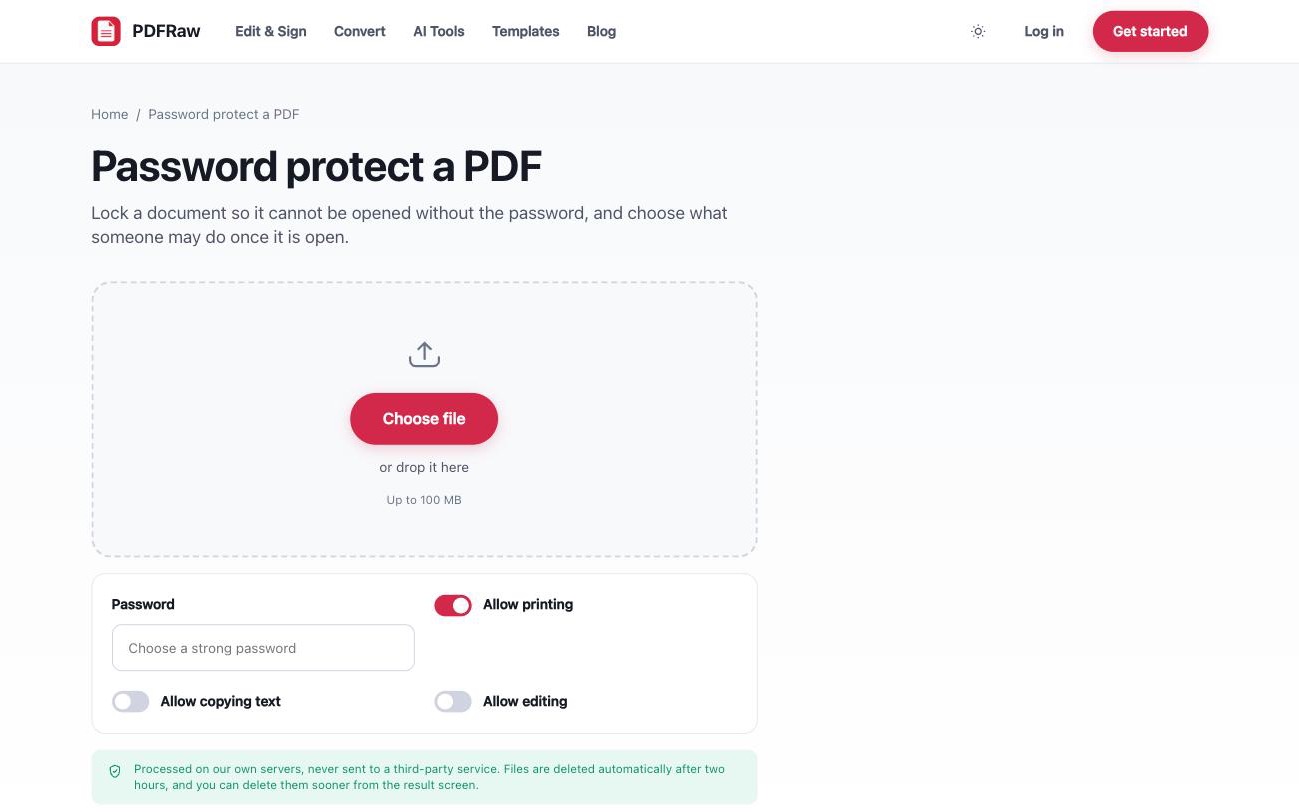
Your password is used to encrypt the file and then discarded. We never store it and cannot recover it, which is exactly what makes the encryption meaningful, so keep a copy somewhere safe before you download. The tool is free, adds no watermark, and files are deleted from our servers two hours after upload. What happens to every upload, and the checks any PDF site should pass first, is covered in is it safe to upload a PDF online.
When password protecting a PDF makes sense
- Signed contracts. Once everyone has signed, a password keeps the signed version the signed version in normal use. If you have just been through the signing step, see how to sign a PDF online; protecting is the natural step after it.
- Payroll and HR documents. Salary letters, references and disciplinary records routinely sit in inboxes for years. Encryption means a compromised mailbox does not expose them.
- Medical and financial records. Anything with health details, account numbers or ID numbers deserves the lock, especially when it travels by email.
Skip the password when it adds friction without protecting much: documents that are already public, or files a large group needs to open where the password will end up pasted into the same chat as the attachment anyway.
Share the password on a separate channel
The most common way PDF protection fails has nothing to do with cryptography: the password sits in the same email as the attachment. Anyone who gets into that mailbox gets both. Send the file by email and the password another way, a text message, a phone call, a messaging app. Two channels, so one compromise is not enough.
Password strength matters just as much. AES-256 does not help if the password is the company name plus the year. A short or common password can be guessed regardless of the algorithm, so use a long passphrase you have not used anywhere else.
Removing a password when you have the right
Protection is sometimes meant to be temporary. Once a contract is archived inside an already-secure system, retyping the password every time is pure friction. Unlock PDF removes a password you know and gives you a file that opens freely, with pages, text and formatting exactly as they were.
It also lifts owner restrictions, the kind where a PDF opens fine but refuses to print or let you copy text, and those come off without entering anything. What it will not do is open a document whose password you do not know. It removes protection from files you are entitled to access; it does not break encryption.
Frequently asked questions
What happens if I forget the password?
We cannot recover it. The password is never stored on our side, which is what makes the encryption meaningful. Keep a copy somewhere safe before you download.
Is this strong enough for confidential documents?
It uses AES-256, the same standard used for encrypted disks. The real limit is your password: a short or common one can be guessed regardless of the algorithm.
Can the recipient remove the password?
Anyone who knows the password can remove it and save an unprotected copy. A password controls who can open the file, not what an authorised reader does afterwards.
Can I block printing or copying without blocking opening?
Yes, printing, copying and editing permissions are set independently of the open password. Be aware that viewers enforce these permissions voluntarily and tools can lift them, so the open password is the only layer that is real encryption.
What happens to my file and password on your servers?
The file is processed on our own servers and deleted automatically two hours after upload. The password is used to encrypt the file and then discarded, never stored.